Consent Mode
A feature that helps advertisers including those operating in the European Economic Area (EEA) and the United Kingdom (UK) communicate and respect user consent choices in line with evolving regulations (see our EU User Consent Policy), while continuing to optimize the quality of their conversion data.
Consent mode allows you to communicate your users’ consent choices made on consent banners to Google tags or SDK so that they can adjust their behaviour accordingly. This allows you to respect user privacy choices when measuring conversions and remarketing users.
Moreover, Consent mode enables modeling to retrieve ad-click-to-conversion journeys lost due to unconsented users. This provides you with a more representative view of your performance, so that you can make efficient campaign optimisation and bidding decisions while always respecting your user’s consent choices.
Starting in 2024, Consent mode (or TCF) is required to keep using measurement, ad personalization, and remarketing features for users based in EEA.The requirements also apply if you are using Google Analytics data with a Google service.
What are we solving for?
Enforcement of the EU User Consent Policy requirements: In 2024, we are strengthening enforcement of our policy. Advertisers must pass and respect consent signals in order to retain audiences and measurement features for EEA users with Google.
Performance impact: users declining consent can lead to a drop in measurement conversions which can lead to less confidence in bidding and optimization.
How it works

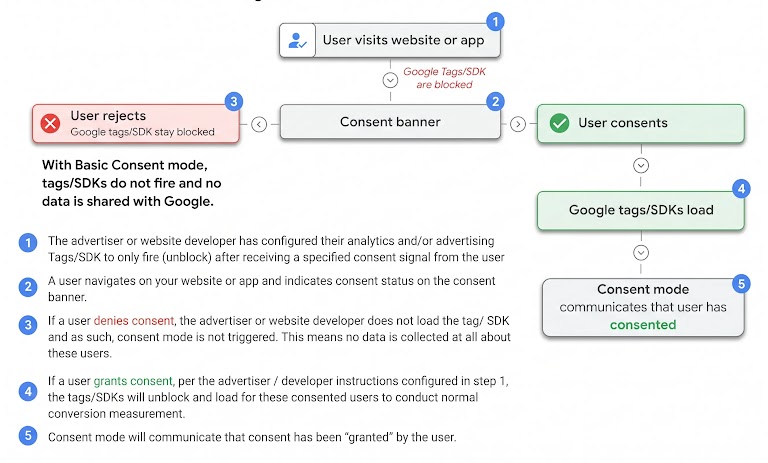
1. User navigates to your website/app and indicates consent status through a consent banner.

2. Consent mode will communicate user consent status for the different parameters to the Google tags/SDK.

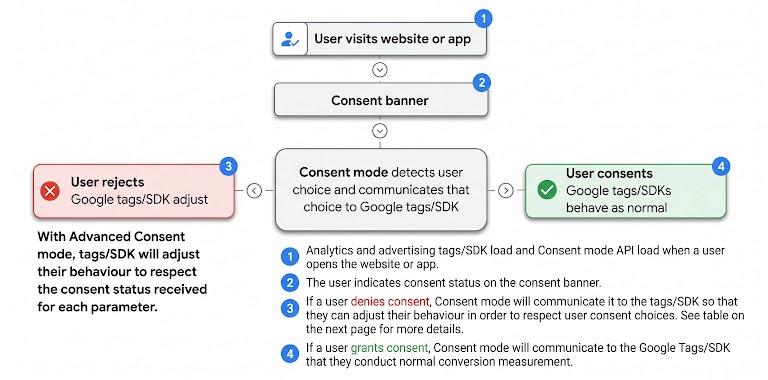
3. When the user consents to all, Google will observe data as normal. When the user does not consent to one or more parameters, the relevant Google tags/SDK will either adjust their behavior to respect user consent choices (with the Advanced implementation of Consent mode) or stay entirely blocked (with the Basic implementation of Consent mode).

4. Thanks to modeling, Google surfaces the most accurate data in your account to enable better reporting and optimization.
Ensure successful implementation
- EEA presence: Consent mode should be implemented by customers with traffic in the EEA and/or the UK. See our EU User Consent Policy for more information on the requirements.
- Consent banner that respects user choices: Consent mode is a mechanism for respecting the consent choices that a user makes on a website or within an app. Therefore, before implementing Consent mode customers must implement consent banners, ideally via a CMP partner for ease of integration.
- Sitewide tagging: To implement Consent mode you must either use Google tag or Google Tag Manager (web) or Google Analytics for Firebase SDK (apps). Legacy tags are not supported.
What is changing with the upgraded Consent mode (v2)?
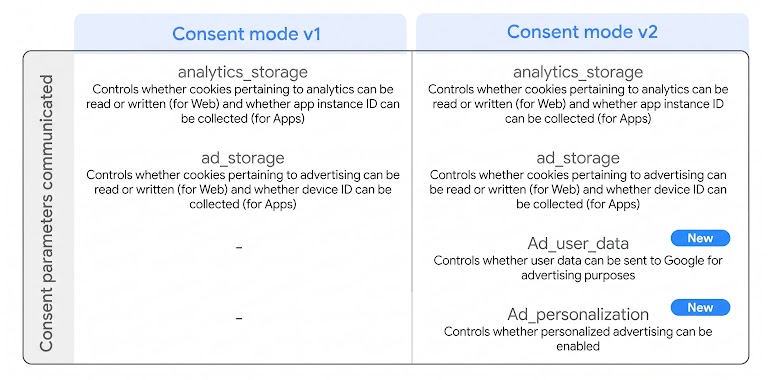
Consent mode communicates consent status for different parameters to the Google tags/SDK. Consent mode v1 communicated consent status (‘'granted'’ / ‘'denied'’) for two parameters controlling the usage of cookies (for web) and of device ID (for app) for analytics and advertising purposes: analytics_storage and ad_storage. The upgraded Consent mode (v2) communicates, in addition to analytics_storage and ad_storage, another two parameters which control the usage of user data for advertising and personalization: ad_user_data and ad_personalization. For each parameter Consent mode will communicate a ''granted''or ''denied'' value to the Google Tags via the gcd and gcs fields.
Starting in March 2024, this upgraded Consent mode (v2) (or TCF v2.2) is required in order to keep using ad personalization and remarketing features for users based in EEA. However, if you already have implemented Consent mode v1 and don’t use ad personalization and remarketing features, you don’t need to upgrade: in March 2024, your consent status (‘'granted'’ / ‘'denied'’) associated with ad_storage will be automatically mapped to ad_user_data; and ad_personalization will always be set as ‘'denied'’. All new implementations should be Consent mode v2 irrespective of whether you use ad personalization/remarketing features.
How does it work with Ads products?
Three of the Consent mode parameters impact Advertising use cases: ad_storage, ad_user_data and ad_personalization. analytics_storage does not impact ads use cases that don’t involve exports from Google Analytics.
The ad_storage parameter controls the collection of advertising data via advertising cookies for web and collection of device ID for Apps.
The ad_user_data parameter controls whether the user data collected can be sent to Google for advertising purposes, including for measurement and audience use cases. In order for measurement features to be enabled in advertising platforms, consent for ad_user_data must be ‘'granted'’. In order for audience features to be enabled in advertising platforms, both ad_user_data and ad_personalization must be ‘'granted'’.
How does it work with Google Analytics?
analytics_storage controls whether analytics cookies can be used for web data and whether app instance ID can be collected for app data. To allow for behavioral measurement in Google Analytics when Consent mode is implemented, analytics_storage must be ‘'granted'’.
Remarketing with Google Analytics audience sharing requires ad_storage, ad_user_data, and ad_personalization to be ‘'granted'’.
Ad measurement in Google Analytics and conversion export to Ads and GMP require ad_user_data to be ‘'granted'’. ad_storage also needs to be ‘'granted'’ to enable app-based conversion attribution and export.
Basic Consent mode
If your tags are blocked by default and you implement the Consent mode script, you will have what we call a ‘Basic Consent mode’ implementation and benefit from ‘Basic consent modeling’ in Google Ads.
User consent choices and tags/SDK behaviours
Basic Consent mode modeling in Google Ads
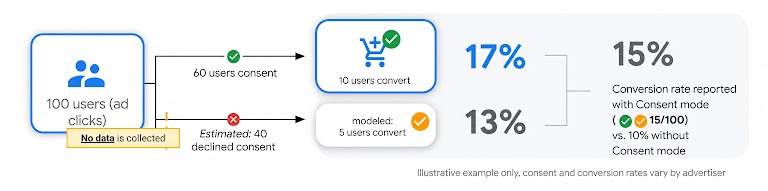
With the Basic implementation, if a user denies consent, the tags will never unblock, no data will be collected and no conversion will be measured for that user.
Our modeling allows you to retrieve more accurate conversion rate by:
- Estimating the number of unconsented users, using the number of ad clicks and consented users which are observable.
- Using the conversion rate of consented users to model the conversion rate of unconsented users: by extrapolating the behavior observed in the consented space to the unconsented space and applying a general factor to the unconsented space to take into account the impact of consent bias on conversion rate (we find that unconsented users are 2-5 times less likely to convert than consented users).
Basic Consent mode data collection and usage
Based on an example where analytics and advertising tags/SDK are blocked until and unless user consents to all
|
Settings |
ad_storage = granted analytics_storage = granted ad_user_data = granted |
ad_storage = denied analytics_storage = denied ad_user_data = denied URL Passthrough = true ads_data_redaction = false |
ad_storage = denied analytics_storage = denied ad_user_data = denied URL Passthrough = false ads_data_redaction = false |
ad_storage = denied analytics_storage = granted ad_user_data = denied URL Passthrough = false ads_data_redaction = true |
ad_storage = granted analytics_storage = denied ad_user_data = granted URL Passthrough = false ads_data_redaction = true |
ad_storage = denied analytics_storage = granted ad_user_data = granted URL Passthrough = false ads_data_redaction = true |
ad_storage = granted analytics_storage = denied ad_user_data = denied URL Passthrough = false ads_data_redaction = true |
|
Tag/SDK blocking |
Assumed tag/SDK blocking set-up: analytics and advertising tags/SDK are blocked until and unless user consents to all |
||||||
|
IP address |
Collected and logged for GAds and Floodlight GA4: collected but not logged |
Not collected Tags/SDKs blocked and stay blocked, no data can be collected |
Not collected Tags/SDKs blocked and stay blocked, no data can be collected |
Not collected Tags/SDKs blocked and stay blocked, no data can be collected |
Not collected Tags/SDKs blocked and stay blocked, no data can be collected |
Not collected Tags/SDKs blocked and stay blocked, no data can be collected |
Not collected Tags/SDKs blocked and stay blocked, no data can be collected |
|
Ad-click Identifiers (e.g., GCLID, DCLID, AUID) |
Collected Identifiers typically stored in 1P cookies |
Not collected Tags/SDKs blocked and stay blocked, no data can be collected |
Not collected Tags/SDKs blocked and stay blocked, no data can be collected |
Not collected Tags/SDKs blocked and stay blocked, no data can be collected |
Not collected Tags/SDKs blocked and stay blocked, no data can be collected |
Not collected Tags/SDKs blocked and stay blocked, no data can be collected |
Not collected Tags/SDKs blocked and stay blocked, no data can be collected |
|
3P Cookies (previously set on google.com, doubleclick.net) |
Enabled Read & written |
Disabled Tags are blocked, no cookie can be written or read |
Disabled Tags are blocked, no cookie can be written or read |
Disabled Tags are blocked, no cookie can be written or read |
Disabled Tags are blocked, no cookie can be written or read |
Disabled Tags are blocked, no cookie can be written or read |
Disabled Tags are blocked, no cookie can be written or read |
| 1P Advertising Cookies |
Enabled Read & written |
Disabled Tags are blocked, no cookie can be written or read |
Disabled Tags are blocked, no cookie can be written or read |
Disabled Tags are blocked, no cookie can be written or read |
Disabled Tags are blocked, no cookie can be written or read |
Disabled Tags are blocked, no cookie can be written or read |
Disabled Tags are blocked, no cookie can be written or read |
| Analytics Cookies |
Enabled Read & written |
Disabled Tags are blocked, no cookie can be written or read |
Disabled Tags are blocked, no cookie can be written or read |
Disabled Tags are blocked, no cookie can be written or read |
Disabled Tags are blocked, no cookie can be written or read |
Disabled Tags are blocked, no cookie can be written or read |
Disabled Tags are blocked, no cookie can be written or read |
| Device ID |
Collected |
Not collected SDKs blocked and stay blocked, no data can be collected |
Not collected SDKs blocked and stay blocked, no data can be collected |
Not collected SDKs blocked and stay blocked, no data can be collected |
Not collected SDKs blocked and stay blocked, no data can be collected |
Not collected SDKs blocked and stay blocked, no data can be collected |
Not collected SDKs blocked and stay blocked, no data can be collected |
| App Instance ID |
Collected |
Not collected SDKs blocked and stay blocked, no data can be collected |
Not collected SDKs blocked and stay blocked, no data can be collected |
Not collected SDKs blocked and stay blocked, no data can be collected |
Not collected SDKs blocked and stay blocked, no data can be collected |
Not collected SDKs blocked and stay blocked, no data can be collected |
Not collected SDKs blocked and stay blocked, no data can be collected |
| Functional, aggregate/non identifying data |
Collected |
Not collected Tags/SDKs blocked and stay blocked, no data can be collected |
Not collected Tags/SDKs blocked and stay blocked, no data can be collected |
Not collected Tags/SDKs blocked and stay blocked, no data can be collected |
Not collected Tags/SDKs blocked and stay blocked, no data can be collected |
Not collected Tags/SDKs blocked and stay blocked, no data can be collected |
Not collected Tags/SDKs blocked and stay blocked, no data can be collected |
| Ad Personalization |
Enabled if ad_personalization = granted Disabled if ad_personalization = denied |
Cannot be enabled Tags/SDKs blocked |
Cannot be enabled Tags/SDKs blocked |
Cannot be enabled Tags/SDKs blocked |
Cannot be enabled Tags/SDKs blocked |
Cannot be enabled Tags/SDKs blocked |
Cannot be enabled Tags/SDKs blocked |
Basic Consent mode FAQs
What is the difference between Basic and Advanced Consent mode?
Basic Consent mode
Having ‘Basic Consent mode’ means that you have blocked your tags/SDK by default. This setup allows the advertiser to transmit no data to Google prior to user interaction with the consent banner. When the user grants consent, load the Google tag and execute the Consent mode APIs. The tags/SDK send the consent states to Google in the following order:
- Send default consent states.
- Send updated consent states.
However, when the user doesn’t consent, no data is transferred to Google at all – not even the consent status. Google tags are completely blocked from firing. Consent mode's conversion modeling in Ads is then based on a general model.
Advanced Consent mode
Having ‘Advanced Consent mode’ means that the Google tags load when a user opens the website or app. The tags load the Consent mode API and do the following:
- Set default consent states. By default, consent will be ‘'denied’', unless you set your own defaults.
While consent is '’denied’', the Google tags send cookieless pings that contain functional and aggregate/non-identifying information. - Wait for user interaction with the banner and update consent states.
Only when a user grants consent to data collection, Google tags send the full measurement data.
The cookieless pings sent when consent is ‘'denied’' with an advanced implementation of Consent mode can unlock additional capabilities in Google Analytics 4 such as such as behavioral modeling and conversion modeling for cookie consent limitations (ie. re-attributing conversions more accurately when data is not observable due to Analytics cookie consent).
Note: Whether you choose to block tags by default (Basic implementation) or unblock tags by default (Advanced implementation), Google tags adjust their behavior based on your users’ consent state.
What data is collected for unconsented users with Basic Consent mode?
With the Basic implementation of Consent mode, no data is collected at all for unconsented users, not even consent status. Google tags are completely blocked from firing, meaning that network requests are blocked from being made to Google. No HTTP communication is established.
What data is collected for consented users with Basic Consent mode? How does Google process the data of the consent signal?
When a user consents, normal conversion tracking will take place. Having Consent mode does not affect how and what data is collected as part of conversion tracking. The only additional information collected by Consent mode for consented users is the consent status (‘'granted'’) which is only used to communicate to the tags/SDK that they can start loading (via the gcd and gcs fields). The consent status is not processed or used for anything else.
What data is used for Basic Consent mode modeling?
With Basic Consent mode data is only collected for consented users. This consented data is used:
- At the user level to record the consented user conversion (i.e. normal conversion tracking as per previous question)
- To model (predict) conversions that likely occurred amongst users who did not grant consent on your consent banner. Consented data used to model to fill in the gaps for the missing data of unconsented users, includes information like:
- Aggregate ad click and conversion volumes
- Country-level location
- Device type
- Browser type
- Time of day
Is my data used to train Google’s model?
Your consent mode data is used to predict and estimate conversions for your account. That data is not shared with other accounts and is not used to project unconsented conversions in other accounts. This applies to the user consented level data and the data used for modeling.
Advanced Consent mode
If your tags load by default and you implement the Consent mode script, you will have what we call an ‘Advanced Consent mode’ implementation and benefit from ‘Advanced consent modeling’ in Google Ads.
User consent choices and tags/SDK behaviours
Advanced Consent mode modeling in Google Ads
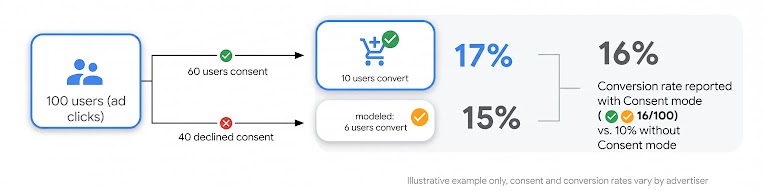
With the Advanced implementation, for unconsented users, only aggregate/non-identifying information is collected (i.e. cookieless pings are fired). The ad-click-to-conversion journey is lost for these users leading to unknown unconsented conversion rate and therefore unknown overall conversion rate.
Our modeling allows to retrieve more accurate conversion rate by using the conversion rate of consented users to model the conversion rate of unconsented users. This done by:
- Analysing which “aggregate and non identifying” signals led to which type of conversion rates in the consented space and extrapolating this to the unconsented space based on the signals observed in the unconsented space.
- Applying a factor to take into account the impact of consent bias on conversion rate (we find that unconsented users are 2-5 times less likely to convert than consented users).
Advanced Consent mode data collection and usage
|
Settings |
ad_storage = granted analytics_storage = granted ad_user_data = granted |
ad_storage = denied analytics_storage = denied ad_user_data = denied URL Passthrough = true ads_data_redaction = false |
ad_storage = denied analytics_storage = denied ad_user_data = denied URL Passthrough = false ads_data_redaction = false |
ad_storage = denied analytics_storage = granted ad_user_data = denied URL Passthrough = false ads_data_redaction = true |
ad_storage = granted analytics_storage = denied ad_user_data = granted URL Passthrough = false ads_data_redaction = true |
ad_storage = denied analytics_storage = granted ad_user_data = granted URL Passthrough = false ads_data_redaction = true |
ad_storage = granted analytics_storage = denied ad_user_data = denied URL Passthrough = false ads_data_redaction = true |
|
IP address |
Collected and logged for GAds and Floodlight GA4: collected but not logged |
Deleted collected & used to derive IP country, but not logged |
Deleted collected & used to derive IP country, but not logged |
Deleted collected & used to derive IP country, but not logged |
Collected and logged for GAds and Floodlight GA4: collected but not logged |
Deleted collected & used to derive IP country, but not logged |
Deleted collected & used to derive IP country, but not logged |
|
Ad-click Identifiers (e.g., GCLID, DCLID, AUID) |
Collected Identifiers typically stored in 1P cookies |
Recovered GCLID is passed in URL |
Recovered GCLID is passed in URL to landing page only |
Redacted GCLID is set to 0 |
Collected |
Redacted GCLID is set to 0 |
Collected GCLID/DCLID only |
|
3P Cookies (previously set on google.com, doubleclick.net) |
Enabled Read & written |
Disabled 3P cookies are prevented from being sent in headers |
Disabled 3P cookies are prevented from being sent in headers |
Disabled 3P cookies are prevented from being sent in headers |
Enabled Read & written |
Disabled 3P cookies are prevented from being sent in headers |
Enabled Read & written |
|
1P Advertising Cookies |
Enabled Read & written |
Disabled No new ads cookies written, existing ones will not be read |
Disabled No new ads cookies written, existing ones will not be read |
Disabled No new ads cookies written, existing ones will not be read |
Enabled Read & written |
Disabled No new ads cookies written, existing ones will not be read |
Enabled Read & written |
|
Analytics Cookies |
Enabled Read & written |
Disabled No 1P analytics cookies will be written or read |
Disabled No 1P analytics cookies will be written or read |
Enabled Read & written |
Disabled No 1P analytics cookies will be written or read |
Enabled Read & written |
Disabled No 1P analytics cookies will be written or read |
|
Device ID |
Collected |
Not collected |
Not collected |
Not collected |
Collected |
Not collected |
Collected but not sent to GAds |
|
App Instance ID |
Collected |
Not collected |
Not collected |
Collected |
Not collected |
Collected |
Not collected |
|
Functional, aggregate/non identifying data |
Collected |
Collected |
Collected |
Collected |
Collected |
Collected |
Collected |
|
Ad Personalization |
Enabled if ad_personalization = granted Disabled if ad_personalization = denied |
Cannot be enabled because ad_user_data is denied |
Cannot be enabled because ad_user_data is denied |
Cannot be enabled because ad_user_data is denied |
Enabled if ad_personalization = granted* Disabled if ad_personalization = denied |
Cannot be enabled because ad_storage is denied |
Cannot be enabled because ad_user_data is denied |
* without analytics_storage, we lose the ability to measure users across sessions in GA4 meaning GA4 audiences that rely on user state, like Lifetime Value (LTV) and returning users, won't work
Advanced Consent mode FAQs
What is the difference between Basic and Advanced Consent mode?
Basic Consent mode
Having ‘Basic Consent mode’ means that you have blocked your tags/SDK by default. This setup allows to transmit no data to Google prior to user interaction with the consent banner. When the user grants consent, Google tags load and execute the Consent mode APIs. The tags/SDK send the consent states to Google in the following order:
- Send default consent states.
- Send updated consent states.
However, when the user doesn’t consent, no data is transferred to Google at all – not even the consent status. Google tags are completely blocked from firing. Consent mode's conversion modeling in Ads is then based on a general model.
Advanced Consent mode
Having ‘Advanced Consent mode’ means that the Google tags load when a user opens the website or app. The tags load the Consent mode API and do the following:
- Set default consent states. By default, consent will be ‘’denied’', unless you set your own defaults.
While consent is '’denied’', the Google tags send cookieless pings that contain functional and aggregate/non-identifying information.
- Wait for user interaction with the banner and update consent states.
Only when a user grants consent to data collection, Google tags send the full measurement data.
The cookieless pings sent when consent is ‘'denied’' with an advanced implementation of Consent mode allow to unlock additional capabilities in Google Analytics 4 such as 1) Behavioural modeling and 2) modeled data in your GA4 property to fill in the gaps for the missing observed data when users decline consent (also known as GA4 Consent Conversion modeling).
Note: Whether you choose to block tags by default (Basic implementation) or unblock tags by default (Advanced implementation), Google tags adjust their behavior based on your users’ consent state.
What data is collected for unconsented users with Advanced Consent mode?
With an Advanced implementation of Consent mode, tags/SDK will adjust to respect user consent choices.
Therefore, if a user denies consent, the tags/SDK will adjust accordingly e.g. no reading/writing of cookies for advertising purposes when ad_storage is '’denied’' or no sending of user data to Google for advertising purposes when ad_user_data is '’denied’'. However, the tags/SDK will send cookieless pings to Ads containing functional and aggregate/non-identifying information:
- Device type, conversion type, time of the day.
- Country: derived from IP address. The IP address is collected but dropped immediately. It is only used to derive IP country. It is never logged or stored.
- Browser type: derived from user agent. User agent is collected but dropped immediately. It is only used to derive browser and device information. It is never logged or stored.
- Page URL: By default, this includes ad-click identifiers (e.g: GCLID) if they are present in the URL at collection. Advertisers can use the setting ads_data_redaction=‘true’ to redact ad-click identifiers.
- Other fields set by the advertiser: continue to be sent normally (e.g., order_id, conversion value).
Similarly, when analytics_storage is ''denied'', cookieless pings are sent to Google Analytics. No Analytics cookies are set, accessed, or read from the device. Consequently, cookieless pings are anonymized and non-identifiable Google Analytics events. Cookieless pings, as part of regular HTTP/browser communication, may include the following information: user agent, screen resolution, IP address. Note that Google Analytics 4 does not store or log IP addresses. If an advertiser sets other fields, such as user_id and custom dimensions, they will be sent normally. The data collected in the cookieless ping is used for behavioral and conversion modeling, to fill the gaps in your data.
What data is collected for consented users with Advanced Consent mode? How does Google process the data of the consent signal?
When a user consents, normal conversion tracking will take place. Having Consent mode does not affect how and what data is collected as part of conversion tracking. The only additional information collected by Consent mode for consented users is the consent status (‘'granted'’) which is used to communicate to the tags/SDK that they can start loading (via the gcd and gcs fields). Moreover, by understanding which data is consented, we can better model and predict what occurs when data is not observable. The consent status is not processed or used for anything else.
What data is used for Advanced Consent mode modeling?
With advanced Consent mode, consented data is used:
- At the user level to record the consented user conversion (i.e. normal conversion tracking as per previous question)
- To model (predict) conversions that likely occurred amongst users who did not grant consent on your consent banner. Consented data used to model to fill in the gaps for the missing data of unconsented users, includes information like:
- Consent status
- Aggregate ad click and conversion volumes
- Country-level location
- Device type
- Browser type
- Time of day
In addition, advanced Consent mode will use the aggregate/non-identifying signals of the unconsented users (as defined in Question 2) to help our model extrapolate consented behaviours to the unconsented space more accurately.
Is my data used to train Google’s model?
Your own data is used to predict and estimate conversions for your account. Your data is not shared with other accounts and is not used to project unconsented conversions in other accounts. This applies to the user consented level data and the data used for modeling. For more details about how Google uses Consent mode data, check out this article.
How can I apply more data controls when using Advanced Consent mode?
Server side Google Tag Manager (sGTM) is a great way to apply additional data control to an Advanced Consent mode implementation while keeping all the modeling benefits of Advanced. Indeed, sGTM allows you to redact or anonymize signals in your own server before sending it to a Google server (e.g. Google Ads). Examples of signals that can be redacted in sGTM include:
- IP address: you can derive the country information from the IP address in your own server and only send the country information to Google.
- User agent: you can derive the browser type information from user agent in your own server and only send the browser type to Google.
If you conduct one or both of these redactions, Advanced modeling will work as intended, since it only uses the derived information of the country or the browser type as opposed to the IP address and user agent.
General Consent mode FAQ
Why do I need to pass a consent signal to Google?
Advertisers must continue to obtain and respect the end user’s consent. This is not new. Consent requirements exist today under GDPR and ePrivacy Directive as reflected in Google’s EU User Consent Policy (EU UCP). The DMA will add an additional reason for Google (as well as other gatekeepers with regulated advertising services) to obtain consent from the end users of third party services to use their personal data for advertising purposes in Europe. The requirements of Google’s EU UCP are not changing, but we are strengthening enforcement of our policy, and we are delivering product upgrades to help advertisers pass consent signals to Google.
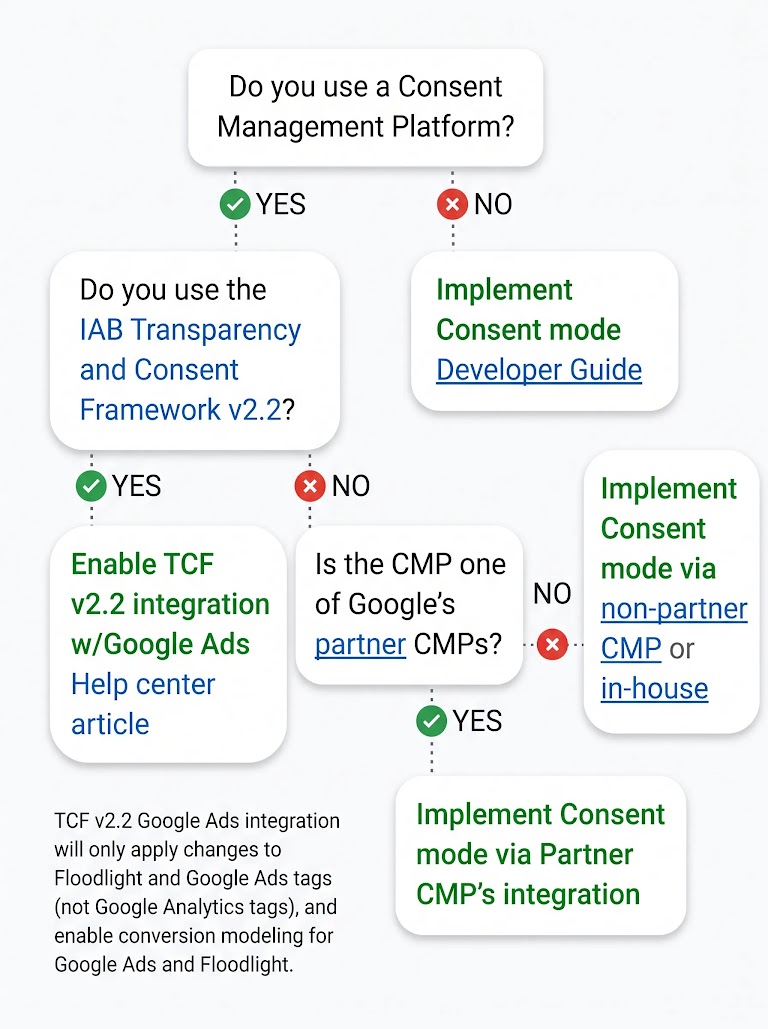
While consent is collected via a consent banner, we also require customers to transmit that consent signal to Google, either by leveraging Consent mode or TCF (see decision tree). The Consent mode script, when correctly implemented, ensures that the consent signal we receive aligns with user choice.
Are both Advanced and Basic implementations of Consent mode sufficient to maintain ad personalization and ad measurement use cases in 2024?
Consent mode will be required to preserve audience targeting functionalities from March 2024. In 2024, our enforcement action will also start impacting measurement features. Both Basic and Advanced implementations include the necessary functionality to meet the compliance requirements to maintain ad personalization and ad measurement. Regardless of whether you choose a Basic or Advanced implementation, the most important action is upgrading to v2 of the Consent Mode API.
Is TCF an alternative to Consent mode?
Yes, TCF is an alternative to Consent mode, it is a valid way of passing consent signals to Google. If you pass consent signals via TCF you will benefit from Consent modeling as well. You can also set up TCF in an Advanced or Basic way i.e. have tags blocked by default until consent is ‘'granted’' or not. However, TCF is not compatible with Google Analytics 4 as it does not include the analytics_storage parameter.
Can I send consent signals via Consent mode without activating the Consent modeling feature?
Modeling is the best way to continue to provide a holistic view of marketing performance while also respecting user choice. Therefore, there is not a functionality of Consent mode that doesn't include modeling.
Besides passing consent signals, what other utility does Consent mode bring?
In addition to allowing advertisers to pass and respect user consent choices, Consent mode also uses conversion modeling to fill conversion measurement gaps where we are unable to measure conversions due to users denying or ignoring consent banners. modeling solutions unlock a more complete picture of your performance in a privacy-preserving way, giving you insights you otherwise would not have and helping you measure and optimise your ad spending.
Is there any difference to the data collected if we implement Consent mode through a CMP?
No, if the parameters sent to Google are the same, the data collected in each scenario is also the same.
Our certified CMPs’ integrations have been verified to pass the right parameters.
How does Google handle the data if a user changes consent status during a session?
If consent changes during a session, the Google tags/SDK will immediately upon next page load begin respecting that new consent choice.
What terms and conditions apply to Consent mode?
Our clients do not need to sign a new agreement when implementing Consent mode.
Consent mode is not a standalone product and does not have its own processor/controller status.
Consent mode is available in Google Tag Manager, Google Analytics, DV360, SA360, CM360, and Google Ads. Since Consent mode is a feature of the Google product in which you implement it for, the underlying product’s terms, including the respective data processing terms, also apply to Consent mode. Please refer to the Terms & Conditions for Google Tag Manager, Google Analytics, Floodlight, and Google Ads conversion tracking and Google Ads Processing terms for additional information.
The underlying product’s respective processor or controller GDPR terms are not affected by Consent mode. You can review the controller/processor statuses of each Google product.
What is Google’s Consent mode position on PII and Personal Data?
Google’s position on what is considered PII can be found here. 'Personal Data' is defined in the GDPR - see here. Google cannot provide legal advice on interpreting the law.
Storage: Can you tell me where my data is stored?
Data is stored in Google’s distributed data centre network, with servers in locations such as EMEA, the USA, APAC, and elsewhere. Google operates data centres globally and to maximise the speed and reliability of our services, our infrastructure is generally set up to serve traffic from the data centre that is the closest to where the traffic originates. Therefore the precise location of Google advertising and analytics personal data may vary depending on where such traffic originates, and this data may be handled by servers located in the EEA and UK or transferred to third countries. Our customers’ properties where Google advertising and analytics products are implemented are generally available globally and often attract a global audience. The technical infrastructure that supports these products is deployed globally to reduce latency and ensure redundancy of systems. Information about the locations of Google data centres is available here.
Retention & Deletion: How long does Google store our data, and how can I request deletion?
Data retention and deletion depends on the functionality and design of the underlying product. Details on a per product basis can be found here. In many cases, due to our privacy-by-design and data minimization practices, we aren't able to identify specific user conversion data in response to a deletion request. Additional details for GA4 data retention and deletion are available here.
Security: How does Google ensure my data is secure?
As with any other data from our tags, Google will keep your data confidential and secure using the same industry-leading standards used to protect our own users’ data. Here is how we handle your data:
- Limited data access. Google uses encryption and employee access controls to protect your data from unauthorized access both inside and outside Google.
- Limited data sharing. Unless we have the advertiser's permission, we don't share advertiser-specific conversion event data with other advertisers. Where required, we may share this data to meet any applicable law, regulation, legal process or enforceable governmental request.
- Data Security. Google is committed to ensuring that the systems we use to store your data remain secure and reliable. We have dedicated security engineering teams to protect against external threats to our systems, and we store all your data in an encrypted format to protect against unauthorised access.
Data security certifications - ISO 27001
Google has earned ISO 27001 certification for the systems, applications, people, technology, processes, and data centers serving a number of Google products, including Consent mode.
What happens if I leverage Consent Mode globally?
Google will respect user consent choices communicated via consent mode or TCF, regardless of their location. Consequently, if you are sending non-EEA consent signals to Google, your measurement and audience functionalities for non-EEA campaign traffic will also be affected depending on the consent signal. We recommend working with your DPO to understand which markets are appropriate for consent mode implementation. Note that Google only requires consent mode for traffic in the EEA. Region-specific settings within the consent API help control and specify how consent mode behaves within different regional contexts. In addition, if you work with a CMP, they can help you specify different types of consent behavior depending on the location of the end user.
For app campaigns, please note that Google Ads only provides conversion modeling for EEA users. Unconsented conversions from non-EEA regions will not be modeled.
Considerations
Who should use Consent mode?

Primarily using Google Ads, SA360 or DV360 for conversion tracking
Basic & Advanced Consent mode will allow conversion modeling for lost conversions due to unconsented users in Google Ads, SA360 and DV360 to optimize bidding performance.

Primarily using Google Analytics 4 for conversion tracking
Advanced Consent mode will allow modeling for lost conversions due to unconsented users in the GA4 UI as well as enabling Behavioural modeling in GA4 UI.
With Basic & Advanced Consent mode, exported conversions from GA4 into Google Ads, SA360 or DV360 will benefit from the conversion modeling of these platforms for lost conversions due to unconsented users to optimize bidding performance.
Implementation paths decision tree
Manual implementation steps
Add three lines of code alongside the standard gtag.js or Tag Manager snippet.
1. Configure default tag behavior
Call one line of code above your standard gtag.js or Google Tag Manager snippet to define whether ad_storage and analytics_storage should be '’granted’' or '’denied’' when the tags first run. Developers may need to dynamically adjust the values based on consent from previous pages.
2. Update tag behavior
Call one more line of code when consent is updated, e.g. after a visitor grants or denies consent. This allows your tags to ‘listen’ to the user’s consent choice when clicking on the banner.
3. Unblock tags/SDK (only for Advanced Consent mode)
Unblock tags/SDK so that they can fire cookieless pings for unconsented users, respecting their consent status. This will help improve conversion modeling accuracy.
4. Enable URL_Passthrough (optional)
If enabled, ad click identifiers (e.g. GCLID) will be appended by your tags to the URL. This line can be added above the snippet with the ‘default’ line or as part of the existing snippet. Make sure to test to ensure this works well with your site.
5. Enable ads_data_redaction (optional)
If enabled, ad click identifiers sent in network requests by Google Ads and Floodlight tags (e.g. GCLID) will be redacted when a user denies consent to ad_storage.
Additional details: Manage consent settings (web), Manager consent settings (app)
Key Terms
Ad Click
An ad click is the action that occurs when a user clicks on a Google ad. When someone clicks an ad, Google Ads counts that as a click. Each click represents a user taking an action. In many but not all cases, that action is directing a user to the advertiser website.
ad_personalization
Once Consent mode v2 is implemented, advertisers will pass a''granted''or ''denied'' value for the parameter called ad_personalization, which controls whether ads personalization i.e. remarketing can be enabled for that user. If a user does not provide consent for ad_personalization, Google tags/SDK will disable the following features from receiving data: Remarketing in Google Ads, Display & Video 360, Search Ads 360 and personalized advertising with Google's advertising products. Read more.
ad_storage
Once Consent mode is implemented, advertisers will pass a''granted''or ''denied'' value for the parameter called ad_storage, which controls cookie behavior for advertising purposes, including conversion measurement. If a user does not provide consent for ads cookies, Google tags will not use cookies for advertising purposes. Read more.
ad_user_data
Once Consent mode v2 is implemented, advertisers will pass a''granted''or ''denied'' value for the parameter called ad_user_data, which controls whether user data can be sent to Google for advertising purposes, including conversion measurement and audiences. If a user does not provide consent for this parameter, Google tags will not send the user data, including user_id and hashed first party data, to advertising platforms. Read more.
ads_data_redaction
With advanced Consent mode, when ad_storage is ‘'denied’', new cookies will not be set for advertising purposes. Additionally, third-party cookies previously set on google.com and doubleclick.net will not be used except for spam and fraud purposes. Data sent to Google will still include the full page URL, including any ad click information in the URL parameters. To redact the ad-click identifier when ad_storage is '’denied'’, set ads_data_redaction to true. Read more.
analytics_storage
Once Consent mode v2 is implemented, advertisers will pass a''granted''or ''denied'' value for the parameter called analytics_storage, which controls cookie behavior for analytics purposes. If a user does not provide consent for analytics cookies, Google tags will not use cookies for analytics purposes. Read more.
App Instance ID
The Google Analytics for Firebase SDK automatically generates and assigns an app-instance identifier to each instance of your app. Analytics uses the ID to identify unique installations of your app and compute user metrics. Learn more about the app-instance ID.
Collect
“Collect” means either collecting the data to store it or collecting the data to view the data. For example, if a website asks a user for their email address, this is the website collecting data from the user.
Consent Management Platform (CMP)
Consent Management Platforms (CMPs) are technology solutions that advertisers and publishers use in order to facilitate the collection of user consent. Google operates a CMP Partner Program. These CMP partners are integrated with Consent mode and Google Tag Manager, ensuring seamless implementation so you can capture valuable insights while protecting user privacy. Our CMP partners will help manage cookie consent banners and direct the consent management process which begins when a user lands on your website and makes a consent choice on a CMP banner. The CMP then communicates that choice to the Google tag via Consent mode, and the tag adjusts its behavior accordingly.
Conversions
An action that's counted when someone interacts with your ad or free product listing (for example, clicks a text ad or views a video ad) and then takes an action that you’ve defined as valuable to your business, such as an online purchase or a call to your business from a mobile phone. Read more.
Conversion modeling
Conversion modeling refers to the use of machine learning to quantify the impact of marketing efforts when a subset of conversions can’t be observed. With a modeling foundation in place, observable data can feed algorithms that also make use of historical trends to confidently validate and inform measurement. Read more.
Cookie
A cookie is a small file containing a string of characters that is sent to your computer when you visit a website. When you visit the site again, the cookie allows that site to recognize your browser. Cookies may store user preferences and other information. You can configure your browser to refuse all cookies or to indicate when a cookie is being sent. However, some website features or services may not function properly without cookies. Learn more about how Google uses cookies and how Google uses data, including cookies, when you use our partners' sites or apps.
Our advertising and measurement cookies
Device ID
The SDK has the capability to collect identifiers for mobile devices and uses technologies similar to cookies. On Android that is the Advertising ID (AdID) and on iOS that is the Advertising Identifier (IDFA).
EU User Consent Policy
This Google policy reflects certain requirements of two European privacy laws: the General Data Protection Regulation (GDPR) and the ePrivacy Directive, as well as any equivalent UK laws.
If your agreement with Google incorporates this policy, or you otherwise use a Google product that incorporates this policy, you must ensure that certain disclosures are given to, and consents obtained from, end users in the European Economic Area along with the UK. Read more.
gcd, gcs, dma, dma_cps fields
Implementation of Consent mode is translated into certain fields like gcd & gcs. These fields collectively provide information about consent states and related configuration settings. Google tag fields may be encoded to improve transmission efficiency. Tag Assistant can help you understand these fields and how your Google tag is behaving, so that you can better debug your setup.
dma and dma_cps are parameters that encode information about Google service consent. Learn more.
These fields may be subject to change as these services evolve.
GCLID/DCLID
Google Click Identifier (GCLID) and DoubleClick Click Identifiers (DCLID) are fields passed in the URL with ad clicks, to identify the campaign and other attributes of the click associated with the ad for ad tracking and campaign attribution. GCLIDs and DCLIDs are generated and assigned when a user clicks on an ad. For more details read, How Google Ads tracks website conversions and How Google uses Consent mode data. Read more.
When a user denies consent, with a Basic Consent mode implementation, the GCLID/DCLID will not be collected at all. With an Advanced Consent mode implementation, fields present in the URL (including GCLID and DCLID) may be collected in cookieless pings by default. However, these fields will not be collected in cookieless pings if the data is redacted (that is if the Consent mode setting ads_data_redaction is set to TRUE). Clients should turn to their legal teams to understand how they interpret GCLIDs.
Google Tags
Google Tag Manager, Global Site Tag (gtag.js), Floodlight, and Google Analytics. Legacy tags (conversions.js, analytics.js) are not supported.
Log
Log means to store in a database. For example, if a website asks a user for their email address and logs it in an internal database for later usage.
Purposes
The Transparency and Consent Framework (TCF) organizes data processing using “Purposes.” Each purpose has a corresponding legal basis of “Consent” or “Legitimate Interest.” Read more.
Read
“Read” means the same as view. Data or signals can be read instead of stored. For example, a website may read a signal from a user to allow cookies on the site. This allows the website to properly serve cookies to the user based on the user’s preferences or consents, but the website doesn't need to store that signal to do so.
SDK
Throughout this document “Google SDK” refers to the Google Analytics for Firebase SDK, also known as the Analytics for Firebase SDK. Read more.
Transparency and Consent Framework (TCF)
The TCF is an accountability tool that relies on standardisation to facilitate compliance with certain provisions of the ePrivacy Directive and the GDPR. It applies principles and requirements derived from these two legislative instruments to the specific context of the online industry, taking account of relevant EU-level guidance from the EDPB and national level guidance from Data Protection Authorities. Read more.
Tag Blocking
- Unblock Tags: Fire tags.
- Block Tags: Don’t fire tags.
URL_passthrough
When a user lands on your website after following an ad, information about the ad may be appended to your landing page URLs as a query parameter. In order to improve conversion accuracy, Google tags usually store this information in first-party cookies on your domain. However, if ad_storage is set to '’denied’', Google tags will not save this information locally. To improve ad click measurement quality when ad_storage is '’denied’ in advanced Consent mode', you can optionally elect to pass ad click information through URL parameters across pages. To enable this capability, set the url_passthrough parameter to true. Read more.
User Agent
Each time someone visits a website, the browser sends a "user agent string" to the website's server. This information helps the website identify the browser and its version, and the operating system you are using. This way, the website can adjust the content it sends to be displayed correctly for a given device. If the Basic version of Consent mode is implemented, user agent is only shared after a user consents.
User data
Cookies, Device ID, User ID, Hashed PII and AUID.
Write
“Write” means the same as modify/create. This means updating or making a new record of the data which is being stored. For example, if a website collects an email address from a user, it may need to write the email address into its storage, which would be the creation of a stored field. Also, if a user wishes to update the user address on file with the website, the website may write the new email address on the existing field in storage.
Learn more
- Developer Guide
- Consent mode Overview
- Google Analytics Help Center
- Google Ads Help Center
- Google Ads Tutorials (video): Maintain tag-based remarketing by capturing consent
- About Consent mode modeling
- How Google Uses this data
- EU User Consent Policy and FAQs
- Updates to Consent mode for traffic in European Economic Area (EEA)
- Adapt to privacy and regulatory changes with Consent mode